Visit Us On:






You've got a drawer full of empty On! nicotine pouches, maybe a whole shoebox worth, and you keep telling yourself you'll enter all those reward codes eventually. "I'll do it this weekend," you say, for the fourteenth weekend in a row.
Been there.
Typing out 14-character alphanumeric codes over and over? Mind-numbing. And who has that kind of patience? Definitely not after the third code when your eyes start crossing and you accidentally type a zero instead of the letter O. Again.
That frustration is why I built the On! Reward Code Scanner over at allthethings.dev.
What's the Big Deal?
The On! rewards program is decent - gift cards, headphones, all sorts of gear. But manual entry? Brutal. If you're sitting on twenty pouches, there goes your evening.
The scanner flips that process on its head. Point your phone at the code on the bottom of your On! pouch, and boom - OCR magic happens right on you smartphone. Code gets recognized, extracted, and saved.
What matters most: everything stays private. Your codes never leave your device. No server upload, no data collection. All OCR processing runs locally in your browser.
Getting Started: The Step-by-Step
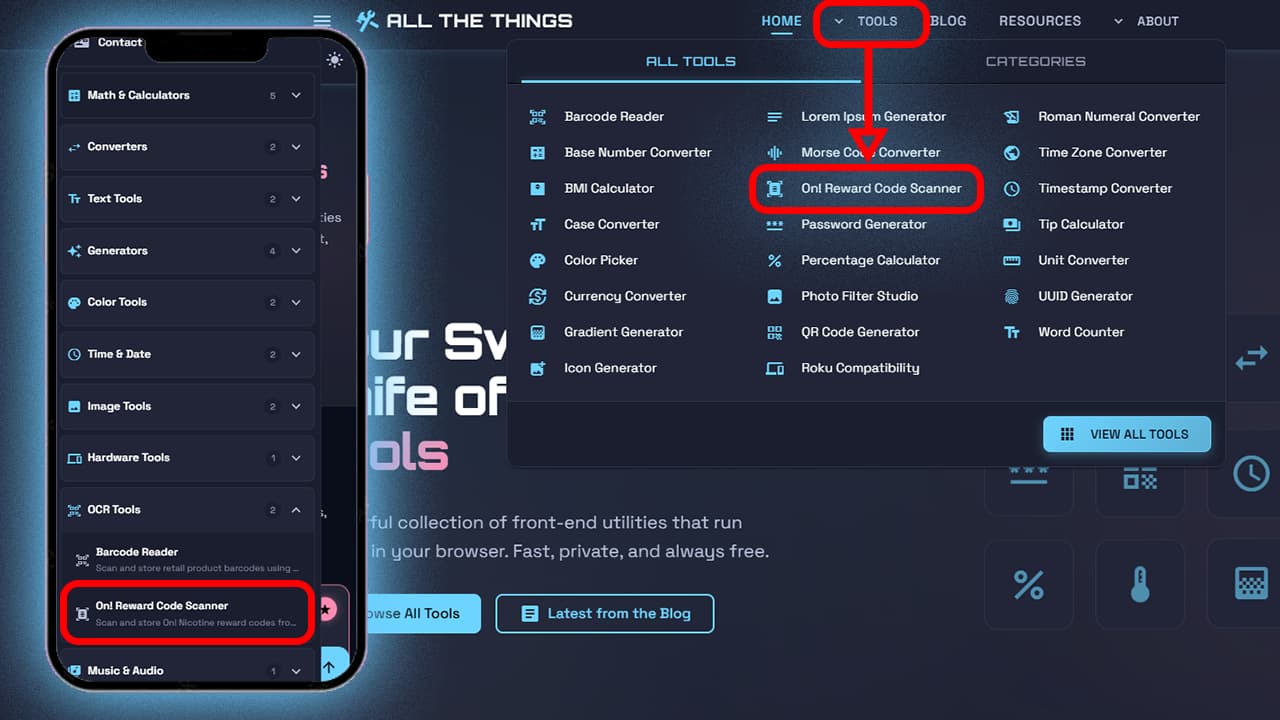
Step 1: Find the Tool
Navigate to allthethings.dev and find the On! Reward Code Scanner, or click here to navigate directly to it.
Step 2: Snap Your Photo
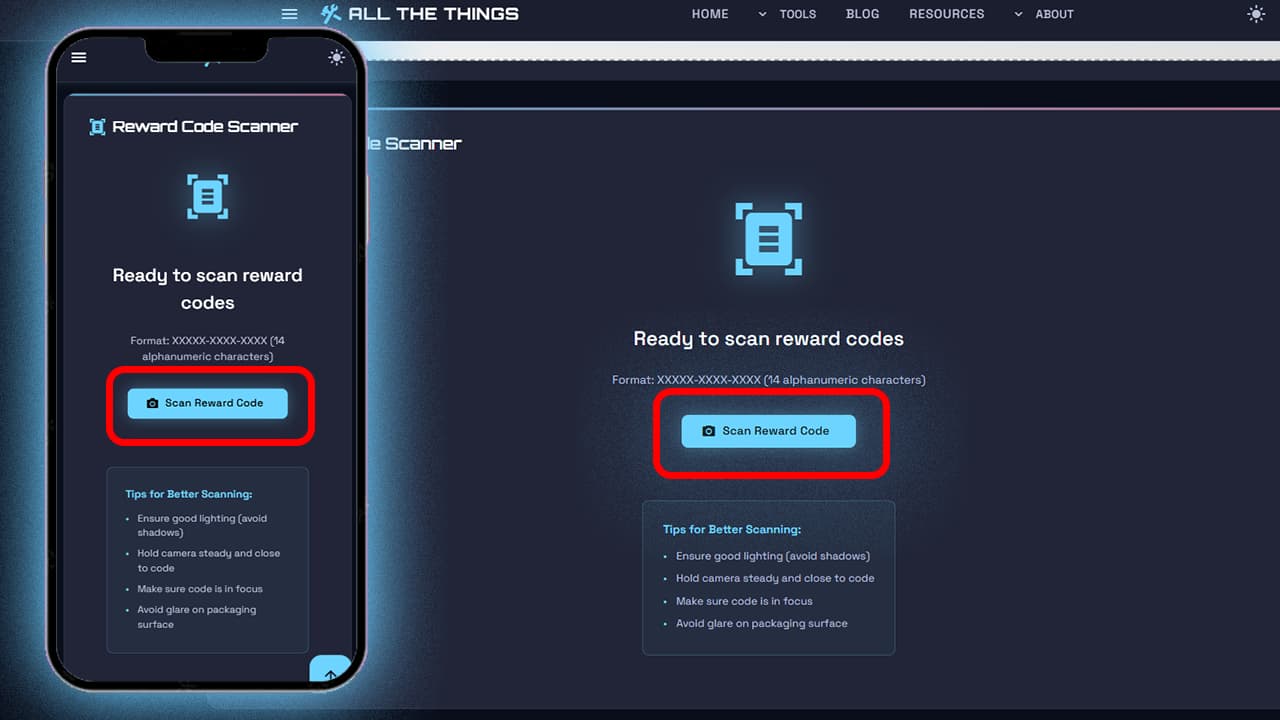
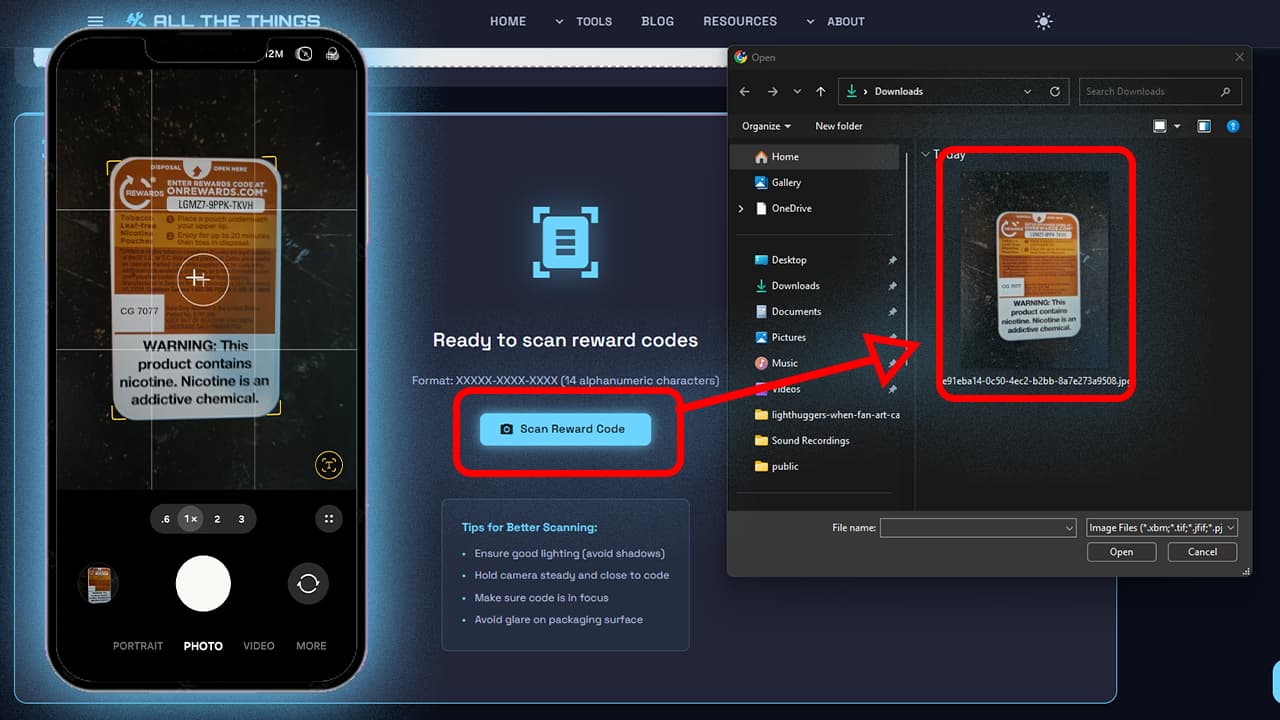
Scroll down to the "Reward Code Scanner" area and select "Scan Reward Code".
Flip your On! pouch over - the reward code's on the back, near the top. Frame it, make sure lighting's decent.
Information
This app does not save any data on any servers. All data is only ever saved in your browser's local storage. Your reward codes remain completely private.
ON MOBILE: Your camera will pop up, use your mobile device's camera to take the picture.
ON DESKTOP: The Open File dialog will pop up, use it to locate the image of the reward code.
Step 3: Position the Crop Box
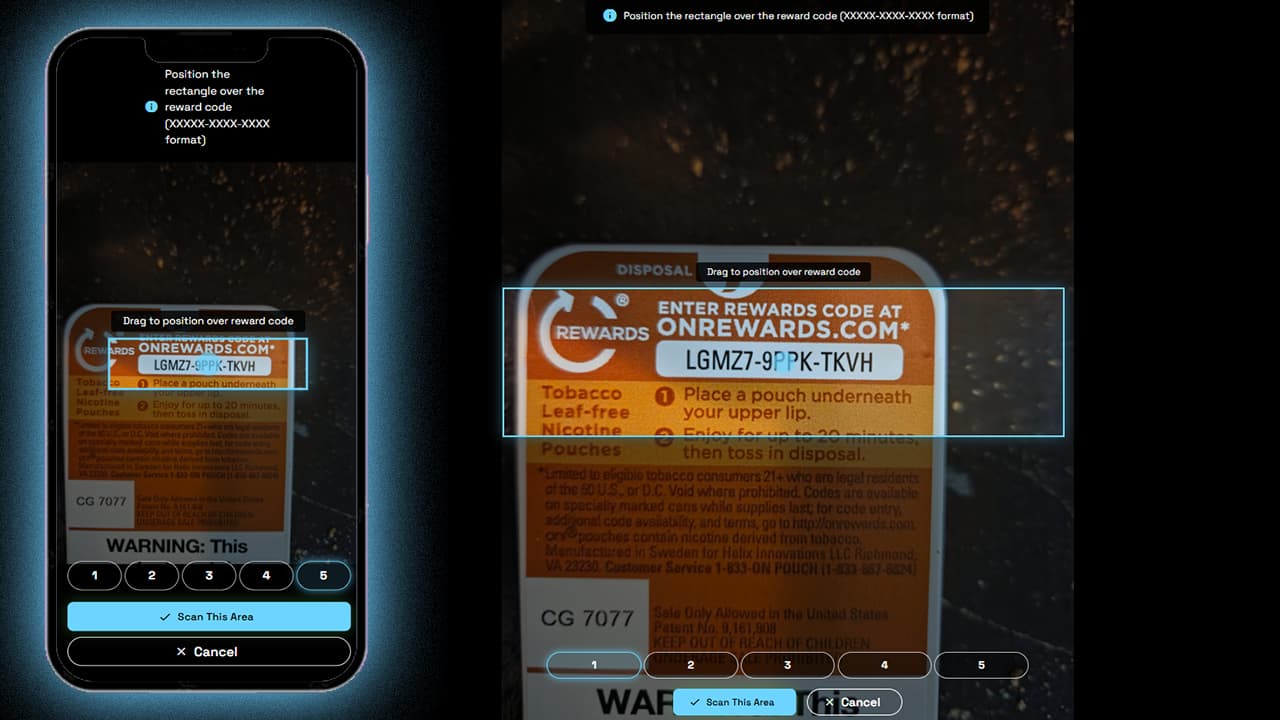
After snapping, you'll see a draggable rectangle overlay. Drag it until it's sitting over your reward code. Size buttons (1-5) at the bottom let you adjust if needed - level 3 usually works.
Sometimes you'll need to select a much larger box that you think - you may have to tinker with it to get it just right.
Information
This is the part that you may have to try a couple times before a successful scan - all mobile devices, cameras and lighting are different, so each case is unique and will have to be adjusted on a per-case basis.
Step 4: Let OCR Work
Hit "Scan This Area." You'll see a progress bar while processing. Takes a few seconds.
Step 5: Review and Approve
You get an approval screen showing:
- Preview of the scanned area
- The detected code
- Options to approve, edit, or retry
Information
If the code wasn't recorded correctly, you can tap or select the code to edit it directly. Make your changes, then tap/click the checkmark button to accept them. Finally, select "Approve & Save" to send the code to your saved codes table.
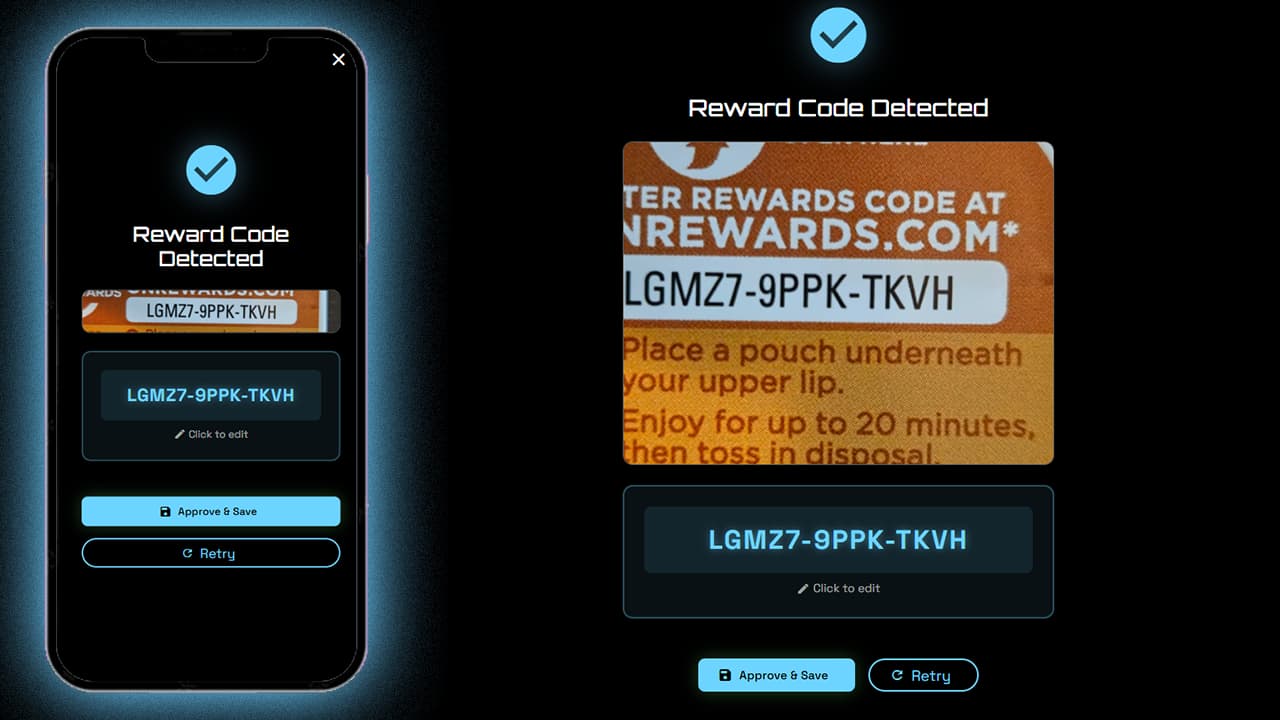
If OCR got something wrong (happens with poorly framed or unfocused images), tap to edit manually. Fix mistakes, tap the checkmark button, then hit "Approve & Save."
Step 6: Keep Going
Code lands in your saved table with a timestamp. Keep scanning - the workflow's designed for rapid-fire entry.
Managing Your Collection
Copy All grabs every code for your clipboard. Perfect for bulk pasting into SMS or WhatsApp.
Download exports as a text file. Handy backup.
Individual actions let you copy or delete specific codes.
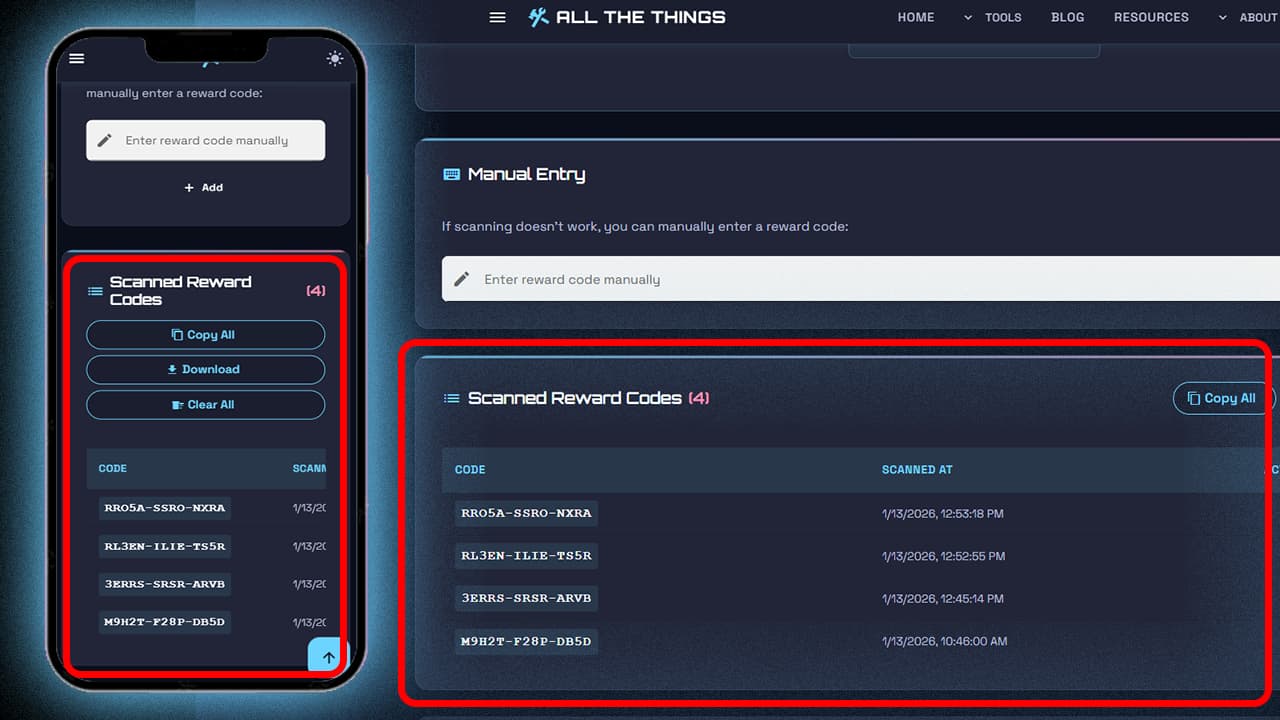
Best part? Codes persist in local storage. Close the tab, reboot - they stick around until you clear them.
Stay in the Loop
Get notified when we add new tools and features
Thank You!
You're all set. We'll keep you updated with the latest tools and features.
When Scanning Doesn't Work
OCR isn't perfect. Bad lighting, faded print, shaky hands - sometimes it struggles.
No problem. Manual entry field sits right below the scanner. Type in the code (auto-formats and validates the pattern) and hit Add.
I designed this assuming maybe 80% scan perfectly; the other 20% will probably need help. The goal was making the process less painful, but will not likely achieve perfection.
Why This Actually Matters
Typos eliminated. VBVTJ-49FZ-7FLB looks a lot like VBV7J-49FZ-7FLB when you're tired. Scanner catches it; eyes might not.
Duplicate protection. Can't remember what you've entered? Doesn't matter - duplicates get rejected automatically.
Speed. Twenty codes in five minutes instead of thirty. That's the difference between actually doing it and "I'll do it this weekend."
Privacy. Zero server uploads. All processing happens on your device. Your codes are yours.
Try the On! Reward Code Scanner
If you've got a pile of On! pouches gathering dust, this tool was built for you. Click here to try the On! Reward Code Scanner and start clearing out that drawer.
No signup. No tracking. Just point, scan, and redeem.
Visit Us On: